# Création d'un container Linux Avec Terraform

1. 1. Paramétrage de PROXMOX (création d'une clé d'API)  
        [![image.png](https://book.techoops.fr/uploads/images/gallery/2023-07/scaled-1680-/Ekcimage.png)](https://book.techoops.fr/uploads/images/gallery/2023-07/Ekcimage.png)
        
        [![image.png](https://book.techoops.fr/uploads/images/gallery/2023-07/scaled-1680-/ofSimage.png)](https://book.techoops.fr/uploads/images/gallery/2023-07/ofSimage.png)
        
        [![image.png](https://book.techoops.fr/uploads/images/gallery/2023-07/scaled-1680-/I3timage.png)](https://book.techoops.fr/uploads/images/gallery/2023-07/I3timage.png)  
        <span style="background-color: rgb(255, 255, 255); color: rgb(224, 62, 45);">**Attention Il faut bien noté le token !!**</span>
    2. <span style="background-color: rgb(255, 255, 255); color: rgb(0, 0, 0);"> Installation de TERRAFORM sur une DEBIAN (Créer un container de management)</span>
        1. <span style="background-color: rgb(255, 255, 255); color: rgb(0, 0, 0);">Suivre la documentation officielle [https://developer.hashicorp.com/terraform/tutorials/aws-get-started/install-cli](https://developer.hashicorp.com/terraform/tutorials/aws-get-started/install-cli)</span>
        2. <span style="background-color: rgb(255, 255, 255); color: rgb(0, 0, 0);"><span style="background-color: rgb(255, 255, 255); color: rgb(0, 0, 0);">Vérifier l'installation de TERRAFORM:  
            </span></span>```bash
            root@MGT-FRONT-01:~# terraform -v
            Terraform v1.5.2
            on linux_amd64
            ```
    3. Premier déploiement de machine 
        1. Créer un dossier de travail:  
            ```bash
            mkdir VM_CREATION && cd VM_CREATION
            ```
        2. On va créer un fichier provider.tf ce fichier va référencer les module que nous utiliserons pour la création des VM.  
            ```
            # Creation du fichier provider.tf
            nano provider.tf
            ```
            
            Contenu du fichier:
            
            ```bash
            terraform {
              required_providers {
                proxmox = {
                  source = "telmate/proxmox"
            #      version = "2.7.4"
                }
              }
            }
            provider "proxmox" {
              # url de Proxmox
              pm_api_url = "https://192.168.1.179:8006/api2/json"
              # api token id is in the form of: <username>@pam!<tokenId>
              pm_tls_insecure = true
              pm_parallel = 2
              pm_user="root@pam"
              pm_password="Espoir15"
            }
            ```
        3. On créer le fichier web.tf:  
            ```bash
            nano web.tf
            ```
            
            Contenu du fichier:
            
            ```bash
            resource "proxmox_lxc" "web" {
              #count        = 2
              count        = 1
              target_node  = "pve-front-01"
              hostname     = "web-front-0${count.index + 1}"
              start        = true
              ostemplate   = "/mnt/pve/ISOs/template/cache/debian-12-standard_12.0-1_amd64.tar.zst"
              unprivileged = true
              ostype       = "debian"
              nameserver   = "172.16.0.3 172.16.0.4 1.1.1.1"
              onboot       = true
              searchdomain = "megaproduction.local"
              memory       = "512"
            #  pool         = "BTS2"
              cores        = "1"
            
              ssh_public_keys = <<-EOT
                ssh-ed25519 AAAAC3NzaC1lZDI1NTE5AAAAIHGQDKDGsODUESc5SWLCK0W2/5yAg/xdrXtVCtgE170H root@adm-front-01
                ssh-ed25519 AAAAC3NzaC1lZDI1NTE5AAAAIIeq/iHCth8j1aKG/DMq0rd3bveLgqksAkwBOhYgAFG1 kvega@fr-lap10398
              EOT
               
              // Terraform will crash without rootfs defined
              rootfs {
                storage = "VMs_HDD"
                size    = "8G"
              }
            
              features {
                fuse    = true
                nesting = true
                mount   = "nfs;cifs"
              }
            
              network {
                name   = "eth0"
                bridge = "vmbr2"
                #ip     = "10.10.10.${2 + count.index + 1}/26"
                ip     = "10.10.10.1/26"
                gw     = "10.10.10.1"
              }
            }
            ```
            
            <p class="callout info">source du provider terraform [PROVIDER-TERRAFORM](https://registry.terraform.io/providers/Telmate/proxmox/2.6.3/docs)  
            </p>
            
            
            1. Initialisation du dossier:  
                ```bash
                root@MGT-FRONT-01:~# terraform init 
                
                Initializing the backend...
                
                Initializing provider plugins...
                - Finding latest version of telmate/proxmox...
                - Installing telmate/proxmox v2.9.14...
                - Installed telmate/proxmox v2.9.14 (self-signed, key ID A9EBBE091B35AFCE)
                
                Partner and community providers are signed by their developers.
                If you'd like to know more about provider signing, you can read about it here:
                https://www.terraform.io/docs/cli/plugins/signing.html
                
                Terraform has created a lock file .terraform.lock.hcl to record the provider
                selections it made above. Include this file in your version control repository
                so that Terraform can guarantee to make the same selections by default when
                you run "terraform init" in the future.
                
                Terraform has been successfully initialized!
                
                You may now begin working with Terraform. Try running "terraform plan" to see
                any changes that are required for your infrastructure. All Terraform commands
                should now work.
                
                If you ever set or change modules or backend configuration for Terraform,
                rerun this command to reinitialize your working directory. If you forget, other
                commands will detect it and remind you to do so if necessary.
                ```
            2. Planification du déploiement (Montre ce qui va être déployé):  
                ```bash
                terraform plan
                ```
            3. On déploie réellement:
                
                ```bash
                terraform apply 
                ```
                
                On valide les modifications:
                
                ```bash
                Do you want to perform these actions?
                  Terraform will perform the actions described above.
                  Only 'yes' will be accepted to approve.
                
                  Enter a value: yes
                ```
                
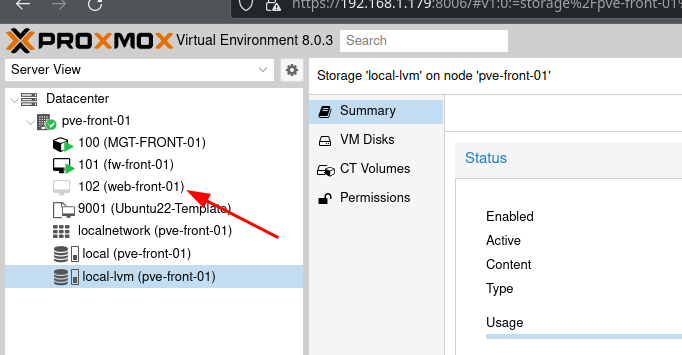
                La VM a été créée:
                
                [![image.png](https://book.techoops.fr/uploads/images/gallery/2023-07/scaled-1680-/6LUimage.png)](https://book.techoops.fr/uploads/images/gallery/2023-07/6LUimage.png)