# Haproxy
# Installation
# Nouvelle page
# Installation sur conteneur LCX
### Déploiement du conteneur:
Pour l'installation d'haproxy sur un conteneur lxc il y a certaines options à paramétrer:
```yaml
resource "proxmox_lxc" "ha-servers" {
count = 1
hostname = "ha-front-0${1 + count.index}"
target_node = "pve-front-01"
ostemplate = "/var/lib/vz/template/cache/debian-12-standard_12.0-1_amd64.tar.zst"
unprivileged = false
onboot = true
start = true
searchdomain = "kvega.local"
memory = 1024
cores = 1
rootfs {
storage = "local-lvm"
size = "8G"
}
features {
fuse = false
nesting = true
mount = "nfs"
}
network {
name = "eth0"
bridge = "vmbr1"
ip = "172.16.250.3/26"
gw = "172.16.250.1"
}
ssh_public_keys = <<-EOT
Votre clé ssh publique
EOT
}
```
Après avoir déployé le conteneur il faudra se connecter desssus en ssh.
Puis procéder comme suit:
1. Installer haproxy
- ```bash
apt update -y && apt upgrade -y
```
- ```bash
apt install haproxy -y
```
2. Vérifier le fonctionnement de haproxy
```bash
root@ha-front-01:~# systemctl status haproxy
* haproxy.service - HAProxy Load Balancer
Loaded: loaded (/lib/systemd/system/haproxy.service; enabled; preset: enabled)
Active: active (running) since Thu 2023-09-21 10:16:53 UTC; 32s ago
Docs: man:haproxy(1)
file:/usr/share/doc/haproxy/configuration.txt.gz
Main PID: 2831 (haproxy)
Tasks: 2 (limit: 4607)
Memory: 39.2M
CPU: 124ms
CGroup: /system.slice/haproxy.service
|-2831 /usr/sbin/haproxy -Ws -f /etc/haproxy/haproxy.cfg -p /run/haproxy.pid -S /run/haproxy-master.sock
`-2833 /usr/sbin/haproxy -Ws -f /etc/haproxy/haproxy.cfg -p /run/haproxy.pid -S /run/haproxy-master.sock
Sep 21 10:16:53 ha-front-01 systemd[1]: Starting haproxy.service - HAProxy Load Balancer...
Sep 21 10:16:53 ha-front-01 haproxy[2831]: [NOTICE] (2831) : New worker (2833) forked
Sep 21 10:16:53 ha-front-01 haproxy[2831]: [NOTICE] (2831) : Loading success.
Sep 21 10:16:53 ha-front-01 systemd[1]: Started haproxy.service - HAProxy Load Balancer.
```
3. Paramétrer le fichier de configuration haproxy pour avoir accès à la page de statistique
```bash
nano /etc/haproxy/haproxy.cfg
```
Ligne à ajouter à la fin du fichier:
```bash
global
log /dev/log local0
log /dev/log local1 notice
chroot /var/lib/haproxy
stats socket /run/haproxy/admin.sock mode 660 level admin
stats timeout 30s
user haproxy
group haproxy
daemon
# Default SSL material locations
ca-base /etc/ssl/certs
crt-base /etc/ssl/private
# See: https://ssl-config.mozilla.org/#server=haproxy&server-version=2.0.3&config=intermediate
ssl-default-bind-ciphers ECDHE-ECDSA-AES128-GCM-SHA256:ECDHE-RSA-AES128-GCM-SHA256:ECDHE-ECDSA-AES256-GCM-SHA384:ECDHE-RSA-AES256-GCM-SHA384:ECDHE-ECDSA-CHACHA20-POLY1305:ECDHE-RSA-CHACHA20-POLY1305:DHE-RSA-AES128-GCM-SHA256:DHE-RSA-AES256-GCM-SHA384
ssl-default-bind-ciphersuites TLS_AES_128_GCM_SHA256:TLS_AES_256_GCM_SHA384:TLS_CHACHA20_POLY1305_SHA256
ssl-default-bind-options ssl-min-ver TLSv1.2 no-tls-tickets
listen stats
bind :9000
mode http
log global
maxconn 10
timeout queue 100s
timeout connect 5s
timeout client 1m
timeout server 1m
stats enable
stats hide-version
stats refresh 30s
stats show-node
stats auth admin:password
stats uri /haproxy?stats
```
4. Tester la configuration haproxy:
```bash
root@ha-front-01:~# haproxy -c -f /etc/haproxy/haproxy.cfg
Configuration file is valid
```
5. Si le fichier est valide on reload le serveur haproxy:
```bash
root@ha-front-01:~# systemctl reload haproxy.service
```
6. Pour tester si la page est OK et si le serveur haproxy est derriére un firewall on peut faire un tunnel ssh pour accéder à la page:
**Mise en place d'un tunnel SSH:**
```bash
ssh -L 9000:172.16.250.3:9000 root@192.168.1.44
```
[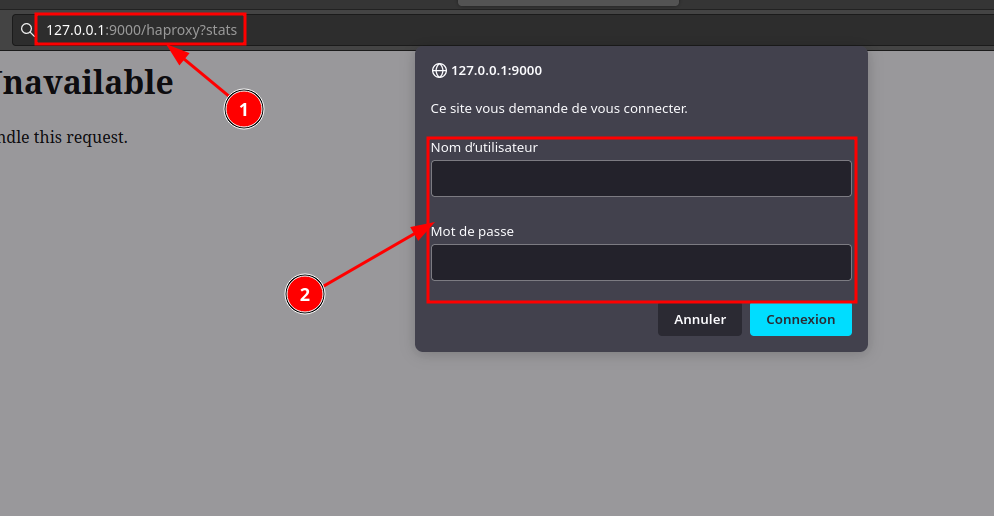](https://book.techoops.fr/uploads/images/gallery/2023-09/image.png)
On atterit bien sur la page de statistiques de haproxy:
[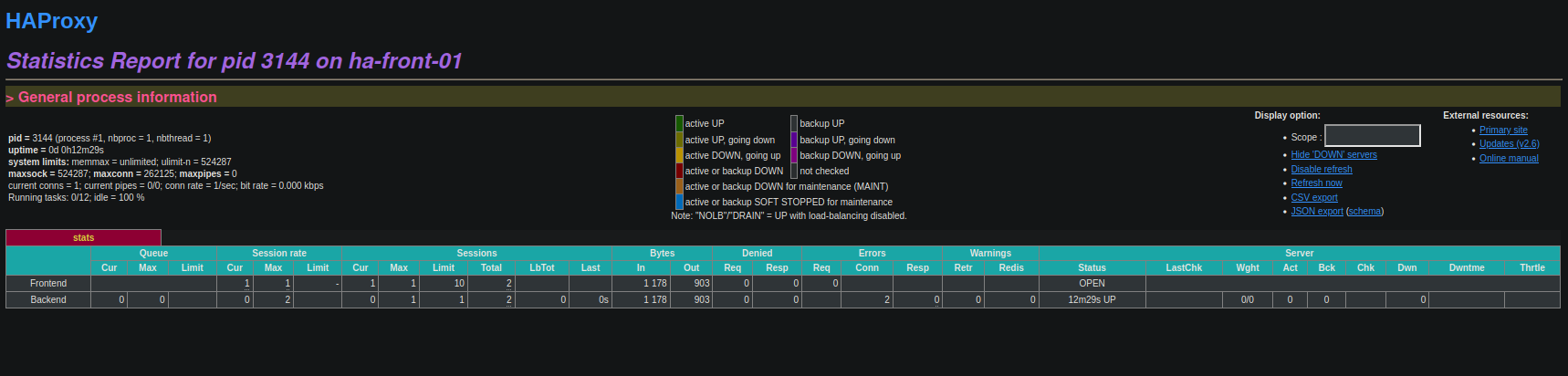](https://book.techoops.fr/uploads/images/gallery/2023-09/t0qimage.png)
# Installation de serveur web derriére le Haproxy
### PRÉREQUIS:
- Avoir 2 machine disonible pour installer les serveur web dessus.
1. Installer le service nginx:
```bash
apt update; apt upgrade; apt install nginx
```
2. Tester si le serveur est bien installé Mes deux serveurs web on ces IPs 172.16.250.4 et 172.16.250.5
Se connecter sur un serveur disposant de la commande curl:
```bash
root@bastion-front-01:~/GIT/cours_bts# for i in {4..5}; do echo -e "####Je vais tester 172.16.250.${i}### \n";curl -IL http://172.16.250.$i ; done
####Je vais tester 172.16.250.4###
HTTP/1.1 200 OK
Server: nginx/1.22.1
Date: Thu, 21 Sep 2023 16:51:40 GMT
Content-Type: text/html
Content-Length: 615
Last-Modified: Thu, 21 Sep 2023 16:47:16 GMT
Connection: keep-alive
ETag: "650c7394-267"
Accept-Ranges: bytes
####Je vais tester 172.16.250.5###
HTTP/1.1 200 OK
Server: nginx/1.22.1
Date: Thu, 21 Sep 2023 16:51:40 GMT
Content-Type: text/html
Content-Length: 615
Last-Modified: Thu, 21 Sep 2023 16:47:20 GMT
Connection: keep-alive
ETag: "650c7398-267"
Accept-Ranges: bytes
```
Les deux serveurs répondent bien
3. Modifier le fichier affiché par Nginx:
```bash
echo $HOSTNAME > /var/www/html/index.nginx-debian.html
```
On refait la commande pour tester:
```bash
root@bastion-front-01:~/GIT/cours_bts# for i in {4..5}; do echo -e "####Je vais tester 172.16.250.${i}### \n";curl -L http://172.16.250.$i ; done
####Je vais tester 172.16.250.4###
web-front-01
####Je vais tester 172.16.250.5###
web-front-02
```
Les deux serveurs répondent bien leurs Hostname(NOM)
4. Paramétrer le serveur haproxy pour qu'il renvoie vers les serveurs web
Ajouter les ligne suivante dans le fichier /etc/haproxy/haproxy.cfg
```bash
#L'ip que je veux mettre en avant
frontend http-external
bind 172.16.250.3:80
default_backend http
#Les IP vers lesquelles je veux renvoyer les requete
backend http
balance roundrobin
mode http
option forwardfor
option http-server-close
server web-front-01 172.16.250.4:80 check
server web-front-02 172.16.250.5:80 check
```
5. On Va tester le fichier de configuration
```bash
haproxy -c -f /etc/haproxy/haproxy.cfg
```
---
1. Puis on va reload le service
```
systemctl reload haproxy
```
2. Nous allons tester sir le haproxy prends bien en compte en regardant la page de stats
[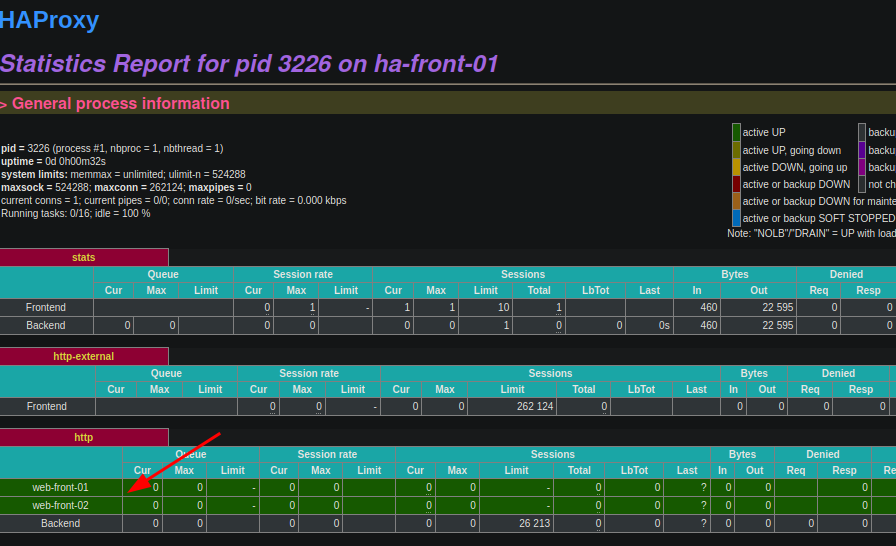](https://book.techoops.fr/uploads/images/gallery/2023-09/VM3image.png)C'est OK on voit bien les deux serveurs
3. On va tester avec la commande curl
```bash
root@bastion-front-01:~/GIT/cours_bts# for i in {1..2}; do curl http://172.16.250.3; done
web-front-01
web-front-02
```