# MISE EN PLACE DU NAT (accés internet)
#### Prérequis:
*Il faut avoir L'application GNS3 installée et la VM aussi.
A l'heure actuelle les version que j'utilise pour ce TP sont:*
- *GNS3 SERVER = 2.2.49*
- *GNS3 VM = 2.2.49*
- *Avoir le template Debian sur la[ VM GNS3](https://book.techoops.fr/books/gns3/page/ajout-template-debian "Template Debian sur GNS3")*
- *Avoir un template Cisco iou L3 sur la [VM GNS3](https://book.techoops.fr/books/gns3/page/ajout-de-template-sur-gns3-vm "Ajout template cisco sur GNS3 VM")*
#### Schéma à mettre en place pour ce tutoriel:
[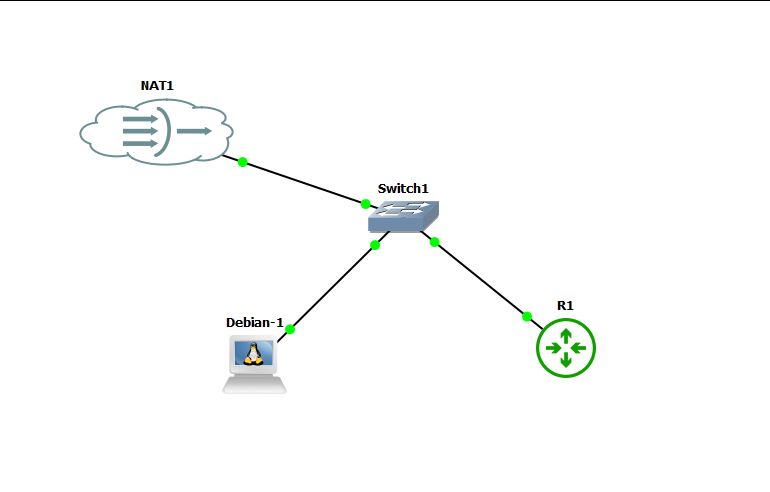](https://book.techoops.fr/uploads/images/gallery/2024-09/image.png)
#### Paramétrage de Debian pour l'accès à internet:
1. S'assurer que la machine est bien démarrée
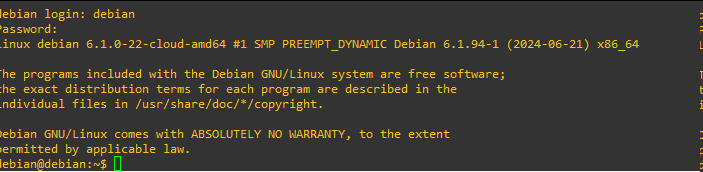
2. Se connecter sur la machine en telnet (Double clic sur la machine)
L'utilisateur est debian et le mot de passe debian aussi
[](https://book.techoops.fr/uploads/images/gallery/2024-09/pryimage.png)
3. Passer en mode superutilisateur
```bash
debian@debian:~$ sudo -i
root@debian:~#
```
4. On va maintenant paramétrer le réseau de la machine en dhcp
1. Editer le fichier de configuration
```bash
root@debian:~# nano /etc/network/interfaces
```
2. Décommenter les lignes suivantes (Comprendre supprimer les # en début de ligne):
1. Avant:
[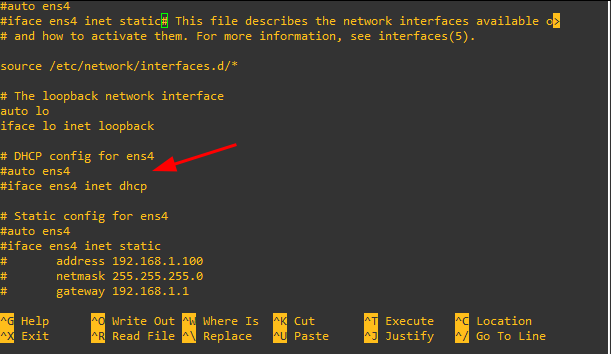](https://book.techoops.fr/uploads/images/gallery/2024-09/gvbimage.png)
2. Après:
[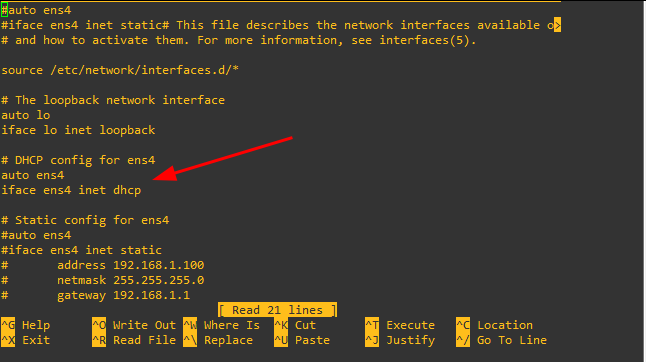](https://book.techoops.fr/uploads/images/gallery/2024-09/fLlimage.png)
3. Enregistrer et quiter
3. Redémarrer le service réseau
```bash
root@debian:~# systemctl restart networking.service
```
4. Vérifier que la machine à bien reçu une adresse IP:
```bash
root@debian:~# ip a |grep ens4
2: ens4: mtu 1500 qdisc fq_codel state UP group default qlen 1000
inet 192.168.122.130/24 brd 192.168.122.255 scope global dynamic ens4
```
La machine a bien reçu une adresse IP.
5. Tester la connexion à internet
```bash
root@debian:~# ping -c 4 8.8.8.8
PING 8.8.8.8 (8.8.8.8) 56(84) bytes of data.
64 bytes from 8.8.8.8: icmp_seq=1 ttl=127 time=19.6 ms
64 bytes from 8.8.8.8: icmp_seq=2 ttl=127 time=20.0 ms
64 bytes from 8.8.8.8: icmp_seq=3 ttl=127 time=22.7 ms
64 bytes from 8.8.8.8: icmp_seq=4 ttl=127 time=21.0 ms
--- 8.8.8.8 ping statistics ---
4 packets transmitted, 4 received, 0% packet loss, time 3034ms
rtt min/avg/max/mdev = 19.610/20.799/22.652/1.180 ms
root@debian:~# ping -c 4 google.fr
PING google.fr (172.217.20.195) 56(84) bytes of data.
64 bytes from par10s50-in-f3.1e100.net (172.217.20.195): icmp_seq=1 ttl=127 time=19.7 ms
64 bytes from par10s50-in-f3.1e100.net (172.217.20.195): icmp_seq=2 ttl=127 time=20.0 ms
64 bytes from par10s50-in-f3.1e100.net (172.217.20.195): icmp_seq=3 ttl=127 time=19.6 ms
64 bytes from par10s50-in-f3.1e100.net (172.217.20.195): icmp_seq=4 ttl=127 time=20.5 ms
--- google.fr ping statistics ---
4 packets transmitted, 4 received, 0% packet loss, time 3030ms
rtt min/avg/max/mdev = 19.564/19.923/20.513/0.369 ms
root@debian:~#
```
Le PING passe bien vers internet le NAT est donc fontionnel
#### Paramétrage d'un routeur CISCO pour l'accès à internet:
1. S'assurer que la machine est bien démarrée
2. Passer en mode configuration
```bash
R1#configure terminal
Enter configuration commands, one per line. End with CNTL/Z.
R1(config)#
```
3. Paramétrer le réseau de la carte Ethernet brancher sur le NAT pour moi c'est la Ethernet 0/0
```bash
R1(config)#interface ethernet 0/0
R1(config-if)#
```
4. Configurer l'interface en mode dhcp
```bash
R1(config-if)#ip address dhcp
```
5. Si vous n'avez rien fait l'interface doit être down
```bash
R1(config-if)#do show ip int brief | include ^Ethernet0/0
Ethernet0/0 unassigned YES manual administratively down down
```
6. Allumer l'interface
```bash
R1(config-if)#no sh
R1(config-if)#
*Sep 8 11:27:26.101: %LINK-3-UPDOWN: Interface Ethernet0/0, changed state to up
*Sep 8 11:27:27.118: %LINEPROTO-5-UPDOWN: Line protocol on Interface Ethernet0/0, changed state to up
R1(config-if)#
*Sep 8 11:27:40.176: %DHCP-6-ADDRESS_ASSIGN: Interface Ethernet0/0 assigned DHCP address 192.168.122.118, mask 255.255.255.0, hostname R1
```
On vois que l'interface Ethernet 0/0 a reçu une adresse IP sur la dernière ligne
7. Tester la connectivité
```bash
R1(config-if)#do ping 8.8.8.8
Type escape sequence to abort.
Sending 5, 100-byte ICMP Echos to 8.8.8.8, timeout is 2 seconds:
.!!!!
Success rate is 80 percent (4/5), round-trip min/avg/max = 18/20/24 ms
```
8. Enregistrer la configuration
```bash
R1(config-if)#do write memory
Warning: Attempting to overwrite an NVRAM configuration previously written
by a different version of the system image.
Overwrite the previous NVRAM configuration?[confirm]
Building configuration...
[OK]
```